Open-source Claude setup for project managers
Your meeting prep and reply drafts, ready before the day starts
Before you start work, Claude reads your chats, mail and tracker. At 09:00 you open Notion and find a reply draft for each message that waits on you.* Each meeting prep lands about 55 minutes before the call. You check, fix and press send yourself.
That is the full setup, built up over a few weeks. On the first evening you get the Notion template and meeting preps on request.
* No magic button: the collectors and inbox-responder run on a morning scheduled task in Cowork, and daily-team-prep and client-meeting-prep are scheduled before each meeting. The computer has to be awake. How the schedule works
- Free Notion template
- Built and tested on macOS
- Beta, used daily by its author
- Free and open source
Autopilot · in the backgroundOff your plate
-
Re-read every chat channeltaken by the skill: slack-collector -
Sort the mail: whose turn is ittaken by the skill: mac-mail-collector -
Draft the repliestaken by the skill: inbox-responder -
Gather blockers for each team synctaken by the skill: daily-team-prep -
Prep each client meetingtaken by the skill: client-meeting-prep
From 09:00 · YouWhat stays human
- Pick the top 3 for today
- Negotiate scope with the client
- Decide whether to take a risk or push a deadline
- Read between the lines, protect the team
Your week before, and the same day after
Day, week and month in fullBefore · a typical week
Numbers from the project this grew up on, before any automation. Context was spread across chats, inboxes, transcripts and people's heads, so every decision meant digging it all up again.
After · the same day
Before 09:00It runs without youYesterday's chats and mail are sorted by whose turn it is to answer. Reply drafts are waiting.09:00 · 15-30 minYou read what came inGo through the threads that wait on you. Send, edit or park each draft. Pick 3 things for today.Before each meetingThe prep is already thereAbout 55 minutes before the call: board movement, blockers, open questions, errors from the last 24 hours. You add your own notes.During the dayReplies in 2-3 batchesThe drafts exist, so a batch takes minutes. A decision goes into the log as a sentence. A "small extra" from the client gets sorted before you agree to it.End of day · 5 minClose and leaveMark what is done, empty the inbox, write a line about tomorrow. The analysis waits for the morning.
Time back
About a full working day a week, back
Before and after, estimated on the author's own project in April 2026. Your numbers will depend on your tools and on how well your project file is filled in, so measure them on your own project.
| Task | Before | After | Saved |
|---|---|---|---|
| Prep for the daily sync | 30 min | 3 min | |
| Writing up a meeting | 45 min | 5 min | |
| Weekly scan of the chats | 2 h | 10 min | |
| Monthly client report | 4 h | 30 min | |
| Cleaning up the board | 1 h | 5 min |
Client: And could you also add an export to CSV? Should be quick, right?
You: Sure, I think we can squeeze it into this sprint.
On the call
A quiet hint when the client asks for "just a small extra"
It listens to the call with you and stays silent until something matters: a new request, a date someone wants you to promise, a line that contradicts a recorded decision, an answer of yours that was off. Then a short hint and a ready phrase appear in a small window. Audio is transcribed on your Mac and never leaves it. After the call, the transcript and a wrap-up are in Notion. Needs an Apple Silicon Mac.
How the call co-pilot worksThe skills
Ask the way you would ask a colleague
In English or Ukrainian. There are 22 skills. Start with 4, and add the next when a routine starts to hurt.
- Say "prep me for the sync on Orbit"
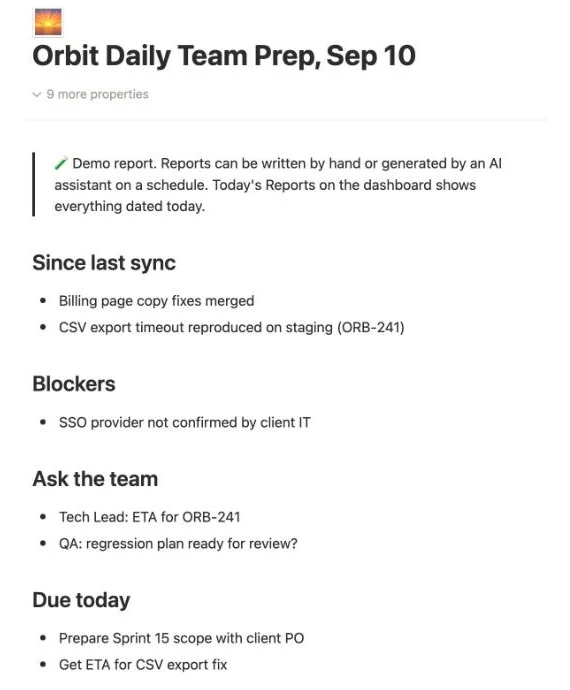
Board movement, blockers and new errors since the last prep, saved to Reports.
- Say "prep the client call"
Status and talking points, matched to who attends the call.
- Say "the client asks for one more thing"
The ask sorted into A, B or C before you agree, with a draft change request.
- Say "monthly client report for Orbit"
A client report in English, ready for you to proofread.
Curious how a message becomes a draft? How it works
The Notion template
All your projects on a single Notion page
A free template with 11 linked databases: threads, meetings, decisions, risks, reports. It works by hand, with no AI at all, so you can start there and add Claude later, or never.
Overnightthe skills fill your records
- Chats
- Meetings
- Tracker
In the morningone place
What needs me today?
- What do I do next?answered from tasks
- Who is waiting for my reply?answered from threads
- Whom should I nudge?answered from threads
- Which risks need me?answered from risks
- What came in overnight?answered from reports
- What is slipping?answered from tasks
Views of the original records, not a second list.
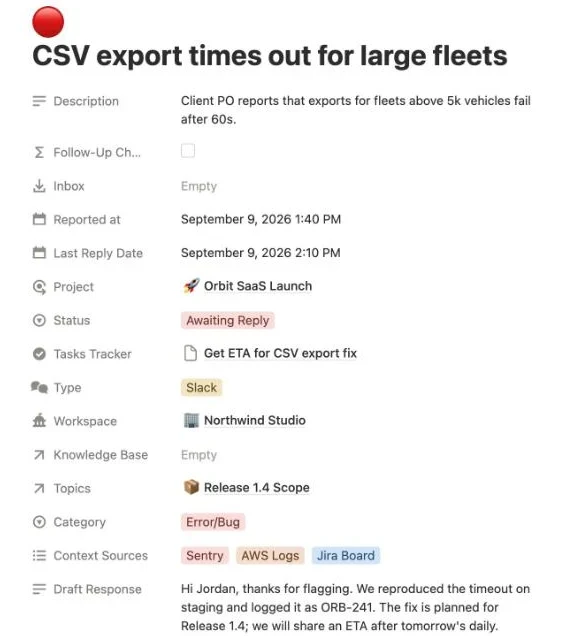
What lands in your Notion
Real pages from the public template, with demo data. You can open them yourself.
Before you try it
What it will and will not do
Better to hear it here than to find out on day 3.
- 1
Your project file wins
If a skill and the file disagree, the skill is out of date. Facts in the file carry an "as of" date.
- 2
It never guesses the project
No project named, it asks. Mixing up 2 clients is the worst thing it could do.
- 3
It never writes to the client
It prepares drafts. Whether to send is always your call.
- 4
It says what it could not see
A source was down or out of date? The report says so at the top.
It does not replace you
It writes the drafts. Priorities, hard conversations with the client and decisions about people stay with you.
It is not plug and play
The basics take an evening, about 4-5 hours. If your project has code, add a few hours in week 1. Then 2-4 weeks of about 15 minutes a day, mostly small edits to the project file.
It is beta
The author uses it every day. Nobody else has installed it yet. Expect rough edges, and please report them.
No budgets or contracts
Budget burn, margin and contract milestones are not covered. Its strength is the flow of messages, meetings and reports.
Your accounts, your data
Claude, in Anthropic's cloud, reads the chats, mail and meeting notes you connect, to write drafts and reports. Results go into your own Notion. Call audio is transcribed on your Mac, and only the text is used. Check that your client contract allows AI tools before you connect a client channel.
Anthropic's privacy policyWhat it costs
The template and the plugin are free (MIT). The author pays about $150 a month for Claude Max plus Notion with Notion AI, because he experiments a lot: 20+ background tasks and new skills in testing. A start with 3-4 skills is about $30-50 a month: Claude Pro plus Notion AI, which gives you meeting transcripts. Pro has not been tested yet, but it may well be enough.
Current Claude plans and pricesWindows?
Built and tested on macOS. Cowork also runs on Windows. 2 skills need a Mac (mail and the call co-pilot), a few need your computer on any OS, the rest run in the cloud. Windows itself is not tested yet.
Where each skill runsWhen it breaks, you see it
If the Mac was asleep or the app was closed, the scheduled reports are simply missing in the morning: press Run now. A report saved only in part says "saved with warnings".
Who made it
Why it exists
I am Bohdan, a delivery PM with 7+ years in software outsourcing. I built this over a year on my own client project: each skill started when I caught myself asking Claude for the same thing again. It is free and MIT licensed, because other PMs have the same week I had.
Set it up yourself
An evening to start, a few weeks to fit
Pick how far to go. You can stop on any floor, and what you built keeps working. It pays off from week 2, when preps and syncs already do the work themselves.
- Floor 1 · 10 min
Just the Notion template
Duplicate it and use it by hand. No AI at all.
Duplicate the template - Floor 2 · an evening · the core
Claude plus Notion
Claude learns your first project and preps your syncs when you ask. Tested on a Mac with Claude Max. Claude Pro may be enough to start.
- Floor 3 · when you miss it
Add-ons, one at a time
Slack, mail, Jira, the schedule, the call co-pilot.